
|
Product |
Jira, Microsoft 365 |
|---|---|
|
Category |
Software development |
|
Stakeholders |
Project managers, development teams |
Using Microsoft 365 tools with Jira for agile software development is a powerful combination for many teams. In the following sections, we’ll show you how integrating both tools can streamline your development process, improve collaboration, and keep everyone aligned throughout the project. Use one shared Teams chat per Epic to centralize all communication, with automatic notifications for all child work items. Post release updates in a dedicated Teams channel to keep your team and stakeholders aligned.
Work in progress: We’re improving use cases with Microsoft 365 for Jira. You want to talk about your individual use case? Get in touch.
Challenge
Software development projects often involve multiple developers, tickets, and sprints running in parallel. Communication gets fragmented across chat threads and meetings, making it hard to track progress or link discussions to the actual work in Jira. Teams need one shared place to align on updates, releases, and sprint progress without losing context.
Solution
With Jira Software integrated into Microsoft 365, teams can manage their development communication in one shared environment. Each Epic has its own Teams chat for all related updates and child work items, while releases and sprint updates are automatically shared in Microsoft Teams. Meetings, discussions, and progress notifications all stay connected to the relevant Jira work items. The process focuses on two key areas:
|
Epic collaboration |
Releases |
|---|
Benefits
-
Centralized communication per Epic: Use one shared Teams chat per Epic to keep all development communication in one place. Every child work item automatically syncs with the same chat, providing full transparency.
-
Aligned sprint updates: Automatically share sprint progress, resolved work items, or blockers in Teams. Everyone stays informed without needing to check Jira manually.
-
Simplified sprint and release communication: Post sprint and release updates directly to Microsoft Teams chats or channels, so project management, development, product, and support teams have a single view of what has shipped.
-
Connected scheduling: Set up development syncs or sprint reviews directly from Jira using Outlook integration. Meetings automatically include the right participants and context.
Epic collaboration
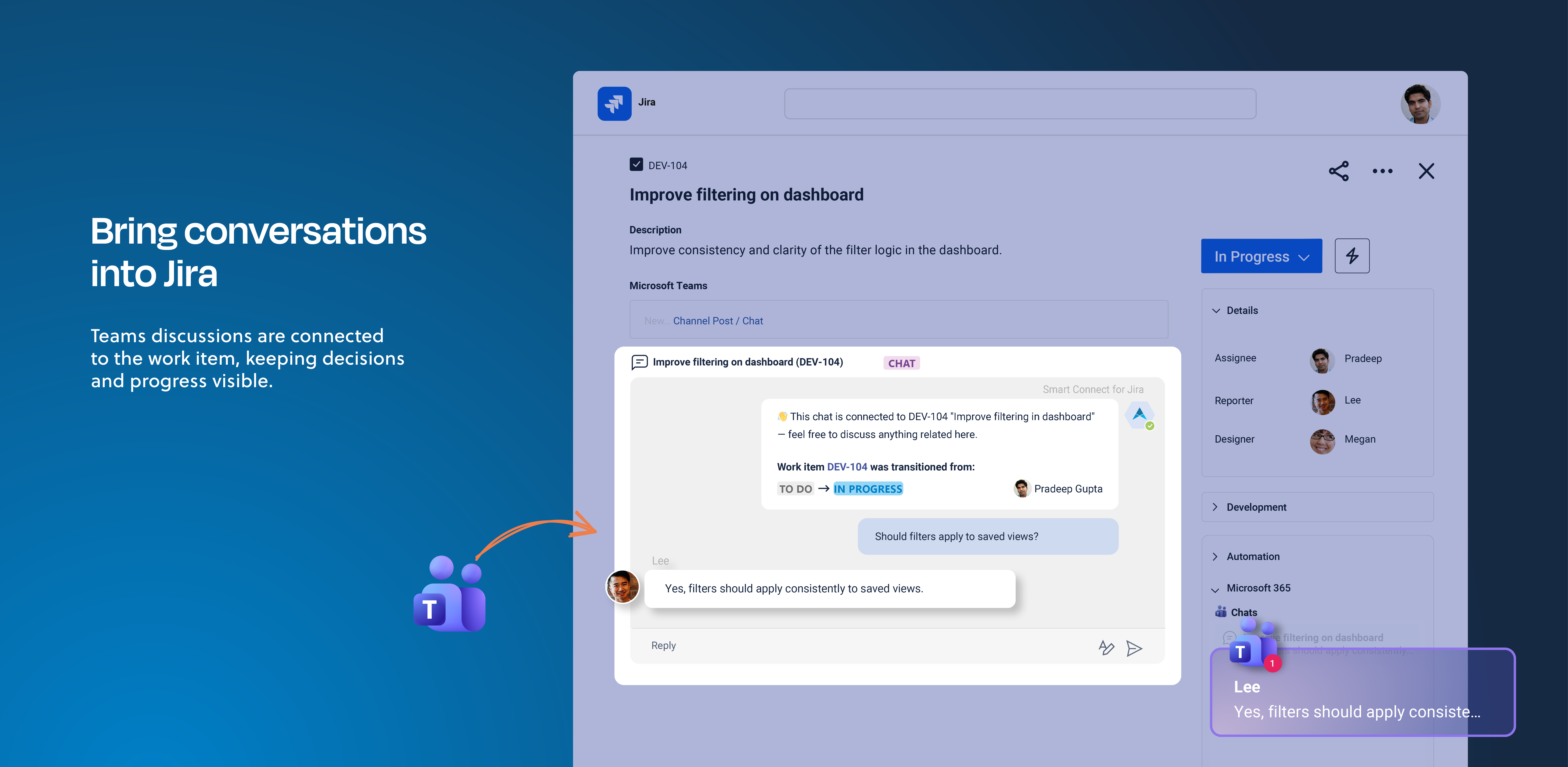
Use Teams as your central hub for Epic communication. Each Epic chat combines fast updates, team alignment, and automated notifications across all related work items.
-
Epic chat in Teams: Use one shared Teams chat for each Epic to discuss progress, assign or resolve work items, and track sprint updates. The chat is also visible in all child work items for full transparency. The chat can be created automatically when an Epic is created. Participants are synced with current assignees, including those assigned to child work items.
-
Sprint notifications: Share automated updates in the Epic chat whenever a sprint starts, ends, or child work items are completed. Teams receive a summary of resolved and open work items for quick visibility.
-
AI summary of progress: Generate weekly or daily summaries that highlight discussion topics, resolved issues, and open items. Summaries can be posted to the chat or added as comments to the Epic in Jira.
-
Outlook meeting sync: Set up meetings directly from the Epic in Jira. Outlook automatically finds the best time for participants and links the meeting to the relevant Epic for easy access.
-
View Jira board in Teams: Allow all users to view the Jira board directly within Teams, providing a roadmap overview without requiring a Jira account.
Releases
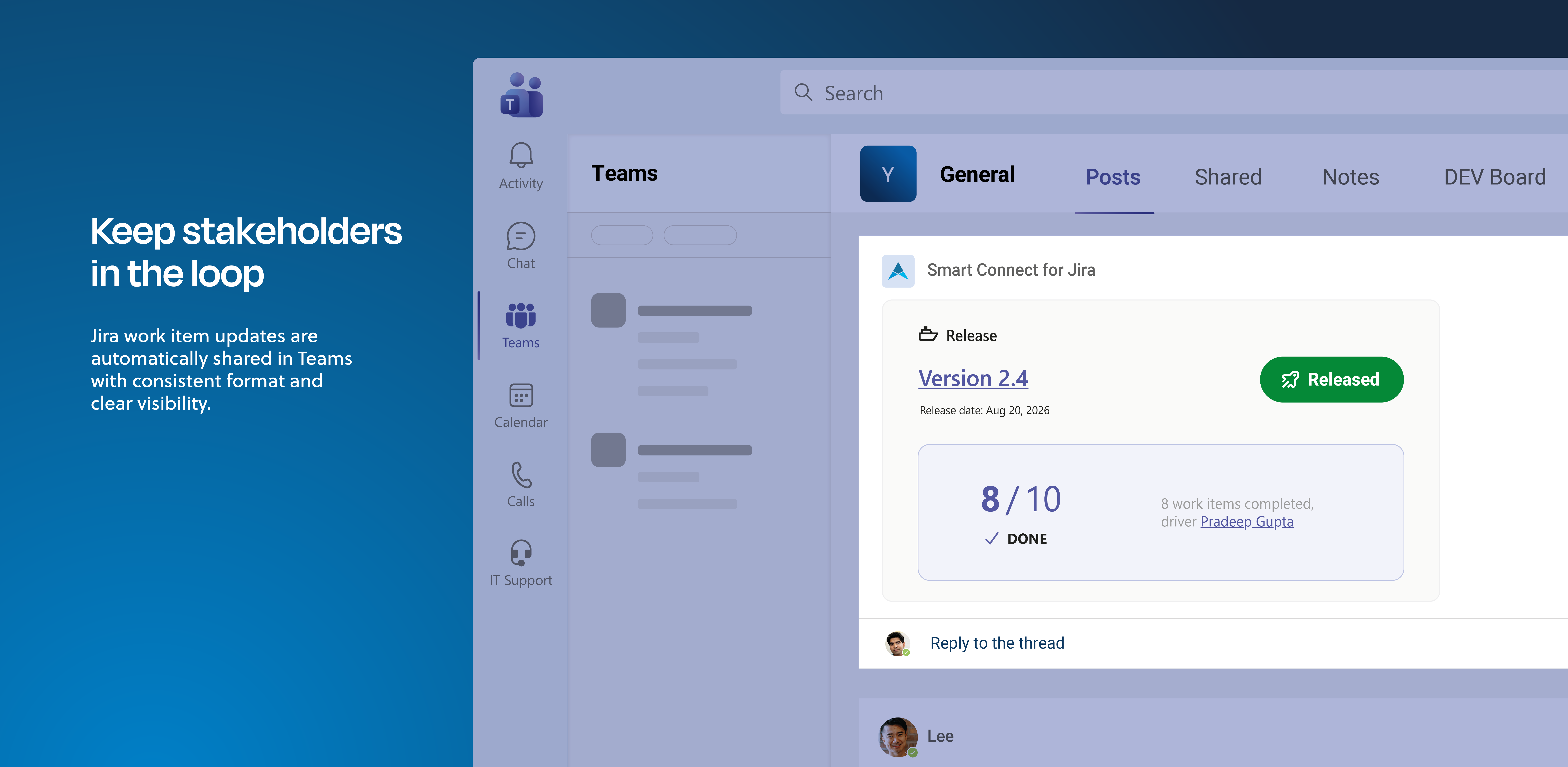
Releases affect multiple stakeholders such as developers, product managers, marketing, and support. Use one Teams channel to keep everyone aligned on what has been released and what remains open.
-
Releases in Microsoft Teams: Automatically post release updates to a Microsoft Teams when a release is completed in Jira. Include key details such as linked Epics, resolved work items, and open bugs.
-
Release notifications: Use adaptive cards to summarize each release. Include the release name, associated Epics, and next steps. Notifications can tag relevant team members or channels for visibility. coming soon
-
Post-release follow-up: Automatically trigger follow-up actions, such as posting open bug lists or checklists for testing validation. Keep the post-release phase transparent and actionable.
Software development made connected
Integrating Jira Software with Microsoft 365 gives development teams one unified workspace. Epic chats keep daily coordination efficient, Teams channels distribute release updates instantly, and Outlook meetings stay in sync with the work. This combination reduces friction, keeps progress visible, and ensures everyone stays on the same page from sprint start to release delivery.
You want to talk about your individual use case? Get in touch!